
Usage
Teams and profiles
The teams that ship, stages and conditions, the measurement baseline, writing a team of your own.
A team — stored as a profile under core.agents.profiles.<key> and edited
under Settings → Agents and pipeline → Teams — is an ordered list of
stages. Each stage runs the agents it names over the tools they are given,
and carries a condition, so a team applies to a sample rather than being
written for one. A stage that declines is a row that says why, never an absent
row.
Teams are configuration, not code. This page is the operator's overview; the complete field reference is Teams and stages in Configuration, and the runtime view is Agents and teams in Architecture.
The teams that ship
| Team | Stages | For |
|---|---|---|
default | triage_pack → analysis (static, dynamic, network) → debate → verdict → report | The general case, and the architecture this project measured itself on. |
measurement | The same four model stages, without the pack and with every tool server withheld | What the ensemble contributes on its own, with nothing to call. |
mobile | triage_pack → triage → android_static → dynamic → debate → verdict → report | An APK or a DEX. The Android stage declines on anything else and says so. |
deep_static | triage_pack → triage → static → reversing → network → debate → verdict → report | Reading the code: the reversing stage takes each static finding into the decompiler. |
team_lead | triage_pack → lead → verdict → report | One lead agent plans, asks the specialists through ask_<agent> tools, and reports what they established. |
triage_pack is the deterministic pre-analysis pack, which runs no model; the
triage stage after it is the triage agent.
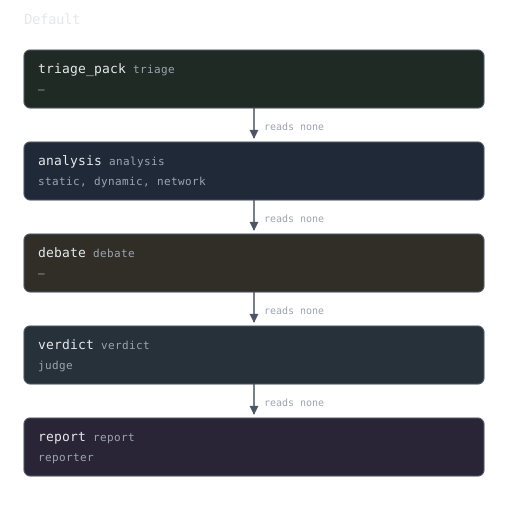
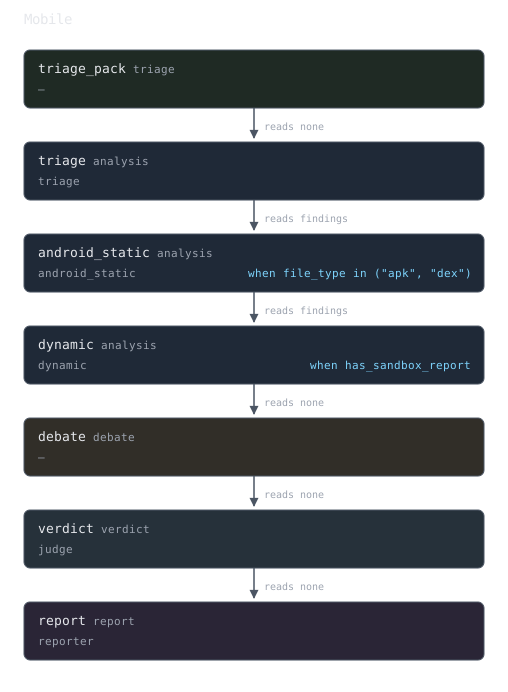
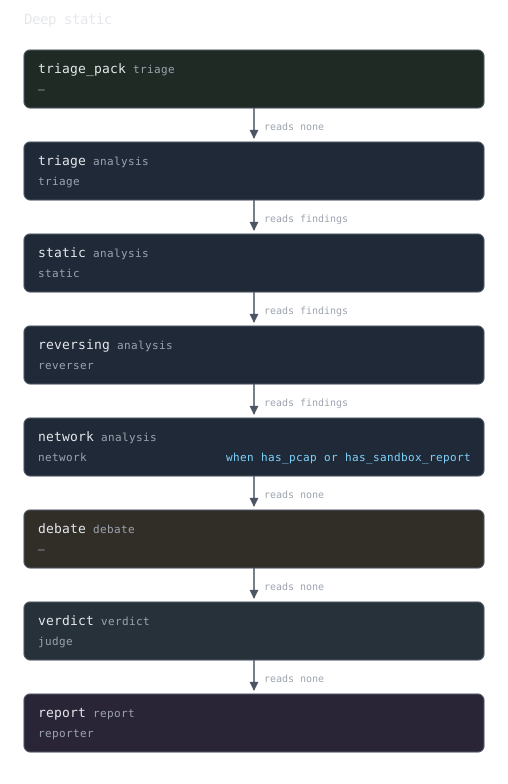
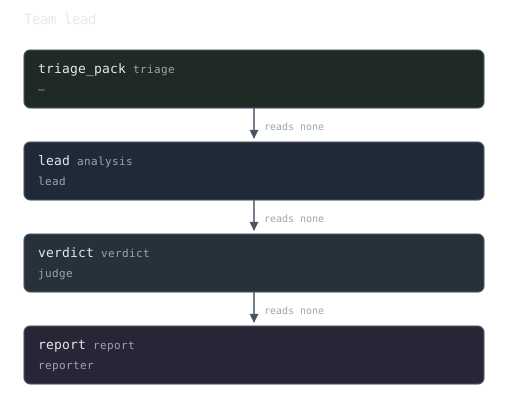
The diagrams are generated from the seeded profiles, and a test fails if they stop matching the teams.
Picking a team
Make it the active team under Settings → Agents and pipeline → Teams
(core.agents.profile).
Name it on the job:
curl -X POST http://localhost:8000/api/v1/jobs \
  -H "Authorization: Bearer $TOKEN" -H 'Content-Type: application/json' \
  -d '{"sample_id":"<id>","config":{"profile":"measurement"}}'
What a stage is
| Field | Meaning |
|---|---|
key | Slug, unique in the team. Names the stage everywhere it is reported. |
kind | triage, analysis, debate, verdict or report. |
agents | The agent definitions the stage runs. |
depends_on | Earlier stages this one runs after. |
when | The condition deciding whether it runs. Empty means always. |
mode | parallel or sequential, for an analysis stage; unset, it follows the job's analyst mode. |
inject_upstream | none, findings or full: what the stage is told about the stages it depends on. |
builtin_tools | false withholds every built-in tool server from this stage's agents. |
The full table, with labels and debate options, is in Teams and stages.
Conditions
when is a small expression language — Python's grammar with an allow-list on
top — over the sample and the run so far:
platform == "windows"
extension in ("apk", "dex")
has_pcap and stages.triage.claim_count > 0
"T1055" in stages.static.technique_ids
triage.rule_hits > 0
triage.hits["signature_rules"] > 0
A condition that does not parse is refused when the team is saved, and the console checks each condition box as it loses focus. One that fails at run time skips its stage with the reason recorded rather than failing the job. Every name the language knows is listed in Conditions.
The measurement baseline
measurement is the same analysts as default with every tool server withheld
(exclude_servers: ["*"]), the in-process sandbox tools withheld and the static
provider forced to none. Running the same sample under both teams answers a
question the default team cannot: how much of the verdict was the tools and how
much was the model. Compare its verdict, its techniques and its
run_summary.corroboration against the default run.
Why a wildcard
A fixed list of the built-in server keys would still hand the baseline any server an operator added afterwards. See Tools, and the measurement baseline.
Writing a team of your own
Built-in teams are editable only in their debate options, their
builtin_tools switches and exclude_servers; everything else means cloning
the team, which the console does in one click.
- Generic agents.
triage,android_staticandreverserare seeded generic definitions: a prompt and a tool list, no class. Clone one as the starting point for an agent of your own. - A prompt that names a tool the agent no longer has. When an agent's own
prompt spells, exactly as declared, the name of a tool the platform knows
(any configured server's, or a shipped declaration's) that the agent's tool
set lacks, the settings answer carries a warning under
core.agents.definitions.<agent>, the job logs one WARNING line naming the agent and the tools. The run summary has no advisory channel, so the run is not marked degraded for it. A plain word such asstringscounts only inside backticks or quotes; a name with_,.,-or a digit counts anywhere. It never refuses a save or a run, and built-in prompts are not checked. - Checked as you type. The team editor sends the staged teams to
POST /api/v1/settings/lint-teamsand draws each team's stage graph with its findings beside it. See Checking a team before it is saved. - Delegation. An agent can ask another agent for work the way it calls a
tool:
ToolRef(kind="agent", agent="static")putsask_staticin its toolbox. See Delegation. - An all-tools team to import.
docs/examples/profiles/all-tools.jsonruns three static analysts on three tools, a Ghidra reverser, and the dynamic and network stages. See An all-tools team for the import and what it needs.
How the analysts of a stage run
core.llm.parallel_analysts is auto (the default), true or false. Under
auto the job decides from the endpoints its models are served at: a hosted
API runs the analysts in parallel, while Ollama or a local server with one slot
runs them one after another, because concurrent analysts on a single-slot
server clobber each other's state. A stage whose own mode is set keeps it.
The rule in full is in How an analysis stage runs its
agents.